
SMS Opt-In and Consent
How clients of SECURICO Guard Services consent to receive text messages, what we send, and how to stop. This page documents the consent flow on our quote request form.
Last updated
The messaging program
Program name: SECURICO Guard Services Messaging. Messages are sent from (949) 818-7303.
We send service follow-up messages to clients after a completed security job, which may include an invitation to leave a review. We also send one-time login passcodes to our own security officers for access to our staff scheduling application; officers provide their number during hiring and onboarding, not through this website.
Only people who have given us their mobile number and ticked the consent box described below, or who have agreed verbally while contracting services, are messaged. We do not use purchased or third-party lists. Message frequency varies: messages are sent one-to-one by our staff in response to a specific job and are not on a fixed recurring schedule. Message and data rates may apply. Reply STOP to opt out at any time, or HELP for help. For support, call (949) 818-7303 or email admin@securicoguards.com.
Where consent is collected
Consent is collected on the final step of the quote request form at securicoguards.com/quote/, directly beneath the phone number field. The checkbox is unchecked by default and is never required — a visitor can request a quote without ticking it, and we do not text anyone who leaves it unticked.
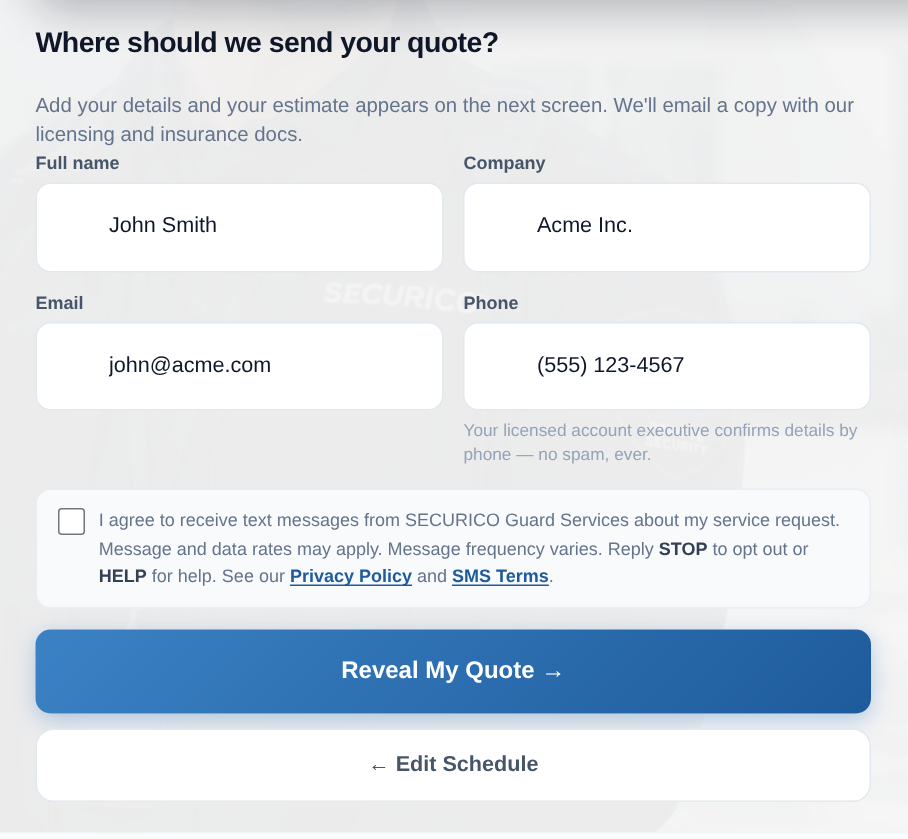

The label reads, in full:
I agree to receive text messages from SECURICO Guard Services about my service request. Message and data rates may apply. Message frequency varies. Reply STOP to opt out or HELP for help. See our Privacy Policy and SMS Terms.
How to reach the form yourself
The consent checkbox is on the last step of the quote wizard. To see it on the live site:
- Go to securicoguards.com/quote/, or press Get Instant Quote in the header of any page.
- Choose a property type, then the security concerns that apply.
- Choose a service type — long-term coverage or a short-term job.
- Enter a site address, then the coverage schedule and hours.
- You now reach the step headed “Where should we send your quote?” The consent checkbox is directly below the phone field, above the Reveal My Quote button.
No account or login is needed at any point, and no payment details are collected.
How to stop messages
Reply STOP to any message to stop all further texts. Reply HELP for help. You can also call (949) 818-7303 or email admin@securicoguards.com and ask us to remove your number. Opting out of text messages does not stop us contacting you by telephone or email about a service you have booked.
We never sell or share mobile information or text-messaging consent with third parties or affiliates for marketing or promotional purposes.